
Featured Article
Implementation
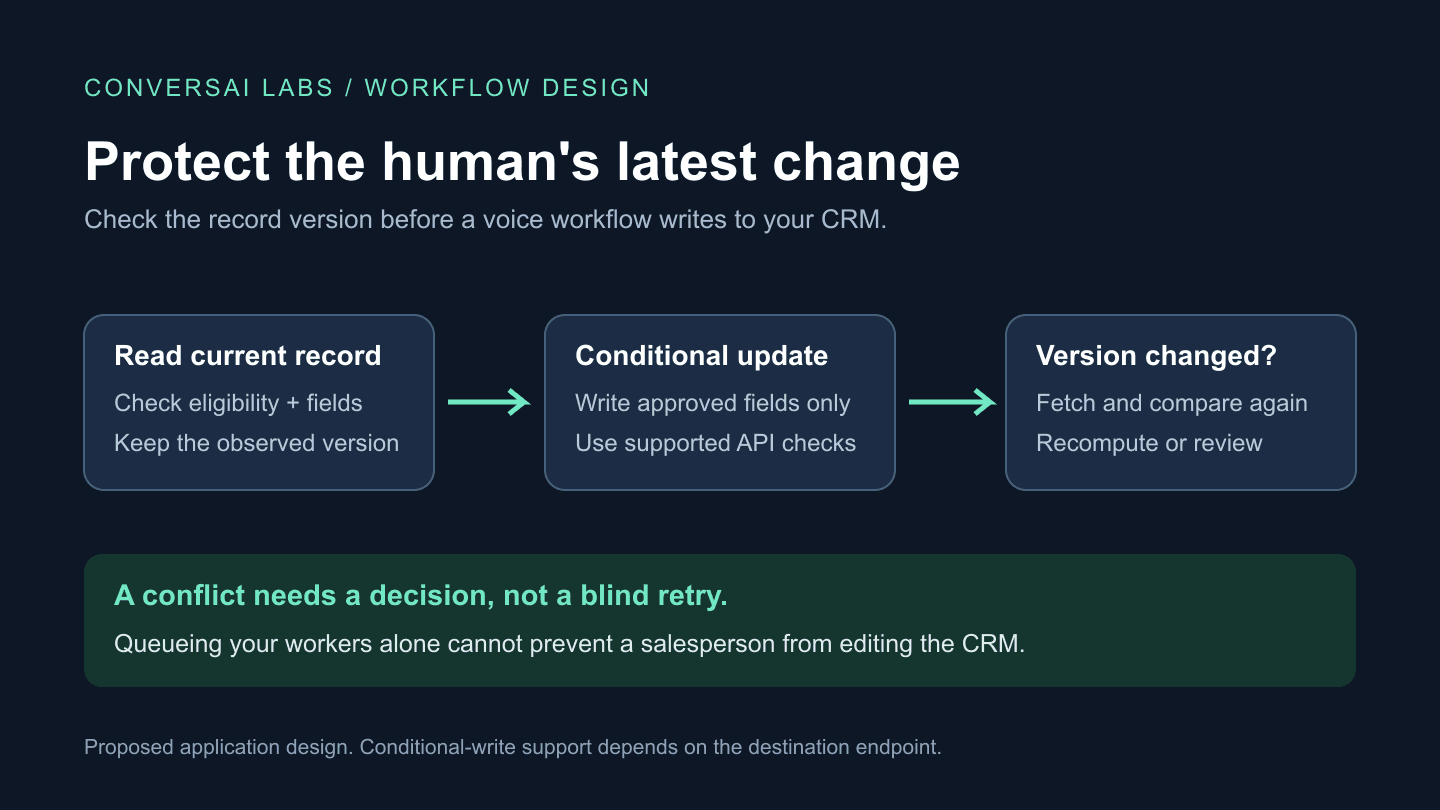
A voice AI workflow should update a CRM record only after checking that the proposed change is still valid against the current record. Limit which fields it may write, use the destination's documented conditional-update mechanism where supported, and send conflicting changes for review. A successful call does not give an automation permission to overwrite a salesperson's newer decision.
ConversAI Labs publishes this guide for developers and marketing operations teams. It describes a proposed integration design, not a tested native CRM connector. The field names, states and examples below belong to the application you build.
How can a voice agent overwrite a human's work?
Consider a lead qualification call. Your workflow reads a lead marked “New”. While the call is running, a salesperson marks that lead “Do not pursue”. After the call, the workflow saves its earlier record snapshot with a new conversation summary. That write can accidentally restore the old lead status.
Two successful requests can therefore produce an incorrect business result. The problem is a stale update: the second writer acts on information that is no longer current. Retrying a webhook safely solves a different problem. You need both duplicate-event protection and a policy for competing changes.
Which CRM fields should the workflow own?
Define field ownership before connecting the agent. Give the integration only the permissions and writable fields it needs. Have application code enforce the allowlist; a prompt alone should not determine which CRM fields can change.
| Field or operation | Suggested policy | When to pause |
|---|---|---|
| Call outcome and call reference | Write to dedicated integration fields or a separate activity | The operation has already been recorded |
| Conversation summary | Create a separate note linked to this call, where the destination supports it | The target record is ambiguous or the note would replace human notes |
| Lead stage or assigned owner | Require an explicit business rule and current-record check | A human or another workflow changed the value |
| Contact preferences | Consult the authoritative preference source before further contact | The preference changed or cannot be checked |
| Appointment time | Apply a confirmed change to the intended appointment | A competing reschedule or cancellation exists |
These are starting policies, not universal CRM defaults. A separately created activity also needs duplicate protection. It is not automatically safe merely because it leaves the lead record untouched.
How do conditional updates prevent stale writes?
A conditional update asks the destination to save a change only if the record still matches the version your application checked. This closes the gap between reading the record and writing it, when the destination implements the condition atomically.
HTTP defines If-Match for this kind of precondition, commonly used to avoid lost updates. It relies on the server's representation validator, not a version number invented by the caller. Sending the header to an endpoint that does not support it is not a guarantee of protection. HTTP Semantics, If-Match.
Support differs by product, object and endpoint. Salesforce's sObject Rows update documentation says supplied field values replace existing values and limits its If-Match handling to Account objects. Do not assume that the same header protects a Lead update. Check the exact object and API version before choosing a concurrency strategy. Salesforce: update records using sObject Rows.
For an appointment example, Google Calendar documents conditional modification using the previously retrieved etag in If-Match. A changed resource produces a 412 Precondition Failed response. Its documentation also distinguishes modification from insertion; this does not make a new booking request idempotent. Google Calendar: resource versions.
What should happen when a conflict is detected?
Use a bounded decision process rather than retrying the stale payload until it succeeds:
- Keep the proposed change separately. Store an opaque operation ID, destination record reference, relevant observed version and intended field changes in your authorized integration store.
- Read current state and eligibility. Check field ownership, current lead state and any contact restriction before deciding to write or make another call.
- Submit a minimal update. Send only approved fields, using the endpoint's supported precondition. Do not send the entire record snapshot back.
- On a conflict, fetch and compare. Determine whether the newer change affects this operation. A new address might allow a fresh call-note operation; a changed contact preference should stop further automated contact pending the applicable policy.
- Recompute or escalate. A permitted merge needs a newly calculated payload and a fresh supported precondition. Conflicting intent goes to an owner with a review deadline. Stop after a small, defined number of attempts.
- Record the outcome. Distinguish applied, already applied, conflict awaiting review, rejected and unknown. A timeout may leave the result unknown; reconcile the destination before retrying.
If the endpoint offers no reliable conditional write, a read immediately before writing still has a race window. A queue can serialize your own workers, but it cannot stop a person or another integration editing the CRM. For sensitive shared fields, keep a proposed change for human approval or write an independent activity instead. Do not describe that fallback as a guaranteed atomic update.
What should you test before enabling CRM writes?
| Test | Expected result |
|---|---|
| Human changes the lead stage during the call | Newer stage remains intact; conflict is visible |
| Two workers update the same record | One supported conditional write succeeds; the other is reconciled |
| The same call notification arrives again | The completed business operation is not duplicated |
| A contact restriction changes before the next call | Eligibility is rechecked and prohibited contact is stopped |
| The write succeeds but its response is lost | Outcome remains unknown until reconciliation establishes it |
| The record was merged or deleted | Workflow stops and resolves the target instead of guessing |
Run these tests in a test environment with the actual destination API. Keep aggregate daily counts for attempted updates, confirmed writes, conflicts, unresolved outcomes and review age. Count unique operations, not every retry as a new success. Keep contact details and transcripts out of general acquisition analytics.
Start with one workflow, one record type and a small field allowlist. Use the ConversAI Labs documentation for the available voice API and workflow capabilities, then enforce the CRM rules in your application or integration layer. For appointment workflows, pair this with destination booking verification so a conversation outcome is checked against the saved business record.
About ConversAI Labs Team
The ConversAI Labs team writes about building and operating voice AI workflows.