
Featured Article
Implementation
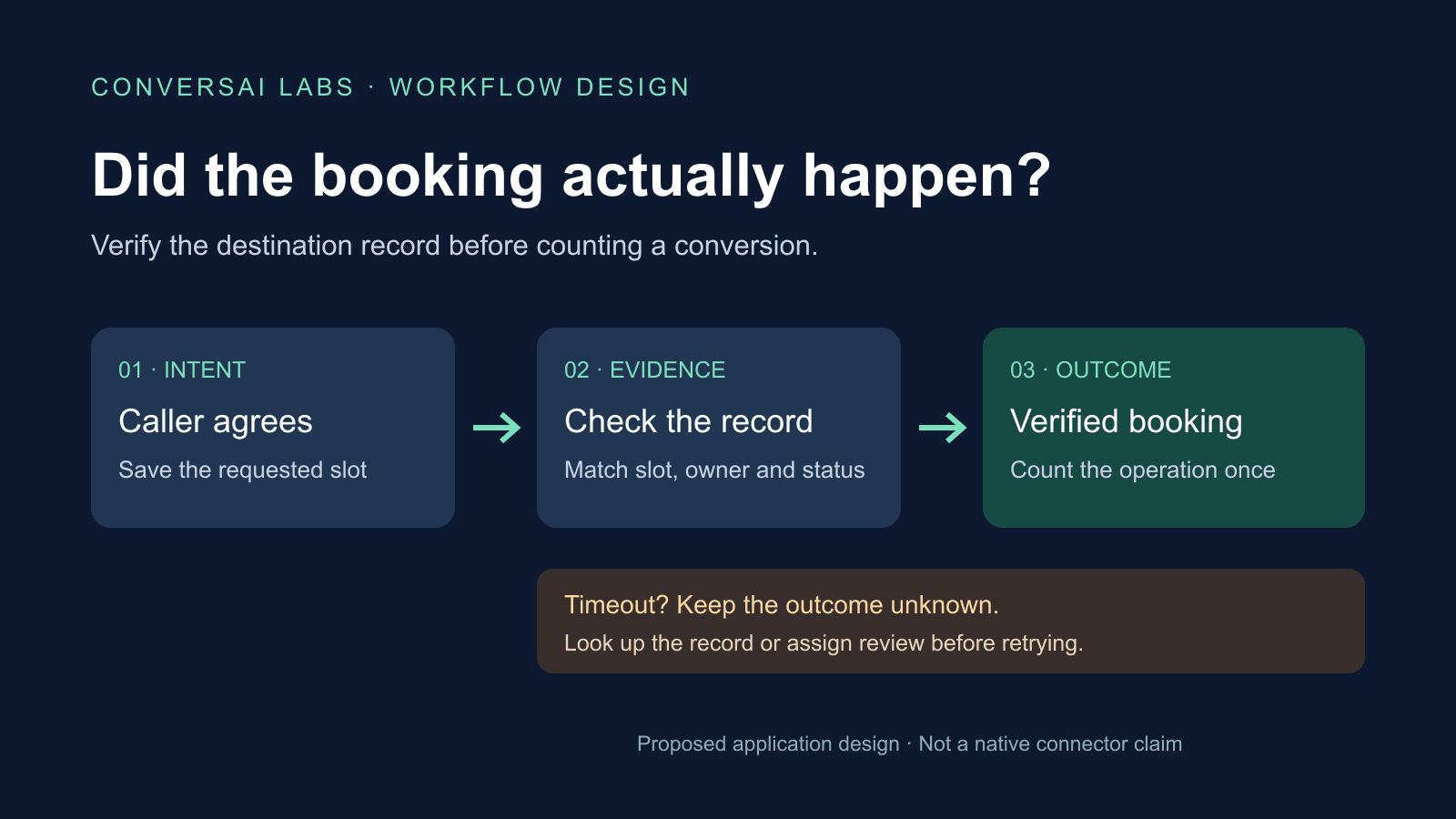
A voice AI call should count as a booked appointment only when your booking system has accepted the intended appointment and your application has checked the returned record. A caller saying “yes”, a call ending normally and a calendar invitation being sent are different events. Keep each visible in your reporting.
This guide shows a proposed booking-verification design for developers and marketing operations teams. ConversAI Labs publishes it as an implementation design, not a tested native calendar connector. The state names and records below are application-owned examples.
What counts as a verified booking?
Define the success condition before running a campaign. For a sales demo, it might require a saved appointment for the correct lead, assigned salesperson, agreed time and duration. If your process also requires the attendee to accept an invitation, track that as an additional step.
| Evidence | What it establishes | What it does not establish |
|---|---|---|
| Call ended normally | A telephony connection finished | The intended person agreed or an appointment exists |
| Caller agreed to a slot | The conversation captured an intention | The booking system saved it |
| Matching booking record saved | Your destination accepted that appointment | The attendee accepted an invitation or attended |
| Attendee accepted | The attendee response indicates acceptance | The meeting happened |
| Attendance recorded | Your attendance source recorded participation | A sale or other downstream business result |
For example, Twilio defines a completed call as an answered call that ended normally. That status is a telephony fact; it does not describe your booking outcome. Check your own provider's event definitions rather than assuming they use identical names. Twilio Call resource.
How should the workflow verify an appointment?
Use one business operation identifier for the booking attempt and keep it separate from the telephone call identifier. One call might change an existing appointment; several calls might relate to the same appointment.
- Confirm the requested slot. Read back the date, local time, time zone, duration and intended person or service. Resolve ambiguity before submitting. Our callback time-zone guide covers ambiguous local times.
- Save the pending operation. Retain an opaque lead reference, operation ID, intended slot and responsible owner before contacting the booking system. Keep contact details in the authorized operational system, not your public analytics report.
- Request the booking. Use the destination's documented API with suitable authorization. If the destination supports a stable request or resource ID, store it before the request.
- Check the returned appointment. Compare the destination ID, calendar or resource, current status, start/end time and relevant participant or owner reference against the intended operation. A successful HTTP response with the wrong slot is still a mismatch.
- Record the result once. Mark the operation verified only when the checks pass. Keep the destination record ID and verification timestamp so the result can be investigated later.
Google Calendar's create-event guide documents supplying your own event ID, subject to its format requirements, to help prevent duplicate creation when a request succeeds at the backend but the client does not receive the result. This is a specific Calendar feature, not a universal property of booking APIs. Google Calendar: create events.
What if the booking request times out?
Treat a timeout as unknown, not automatically failed or successful. The destination may have saved the appointment before the response was lost.
If the integration uses Google Calendar and already knows the event ID, events.get can retrieve that event using its calendar and event identifiers. Match the retrieved record to the saved operation before accepting it as evidence. Google Calendar: events.get.
A practical state model is:
pending -> verified
pending -> unknown -> verified
pending -> unknown -> needs_review
pending -> rejected
verified -> cancelled
verified -> changed -> needs_review
These are illustrative application states, not ConversAI API fields. Use bounded retries and a deadline for unresolved operations. A missing record, permission error or temporary API error needs interpretation; do not create another appointment blindly. If the destination has no safe lookup or duplicate-prevention mechanism, route uncertainty to an owner for review.
During the call, the agent should say “I am checking the booking” while the outcome is pending. If it cannot verify in time, explain that confirmation is pending and provide the next step your business can actually deliver. Avoid promising a booked slot merely because a request was submitted.
For transport-level duplicate delivery, use the separate webhook retry and idempotency guide. Booking verification answers whether the intended business action happened after processing.
How do cancellations and changes affect the report?
Keep the original verification event and update the current appointment state. Report “bookings verified during the week” separately from “active bookings as of the reporting cutoff”. Otherwise a later cancellation can either disappear from the audit history or remain incorrectly counted as an active appointment.
Google Calendar exposes event status and attendee response status as separate fields. An event's confirmed status should not be interpreted as proof that each attendee has accepted; inspect the relevant attendee response if acceptance is part of your business definition. Neither field proves attendance. Google Calendar event resource.
If someone reschedules, reconcile the latest intended slot and destination record. Keep a revision or change timestamp so an older response cannot silently restore a superseded appointment.
What should the daily booking report show?
Use a consistent cohort and clearly state the cutoff. For example, group unique booking operations first requested that day, then report how many are verified, rejected, unknown or awaiting review at the cutoff. Operations still pending must remain visible.
A separate operational view can show newly verified appointments, cancellations and reschedules that occurred that day, including older requests. Do not combine these two views into a single conversion rate.
Track at least:
- Unique booking requests and verified bookings, with the chosen denominator stated.
- Unknown outcomes, how long they have remained unresolved and the responsible owner.
- Field mismatches, duplicate appointments and cancellations.
- Attendee acceptance and attendance, only when a suitable source provides them.
Use aggregate counts and opaque references for analysis. A polished conversation summary should not be the source of truth for a saved appointment.
What should you test before launch?
Test an ordinary successful booking, a rejected slot, a response timeout after creation, a duplicate notification, a wrong-time response, a cancellation, a reschedule and an expired API permission. In each case, check the destination record and the report. An unresolved request should produce a visible review item, not an invented success.
Start with one workflow and one destination. Use the ConversAI Labs documentation to check the available voice API and workflow capabilities, and implement the booking verification in your application or integration layer. Confirm the destination's permissions and behavior in your own test environment before enabling real appointments.
About ConversAI Labs Team
The ConversAI Labs team writes about building and operating voice AI workflows.