
Featured Article
Implementation
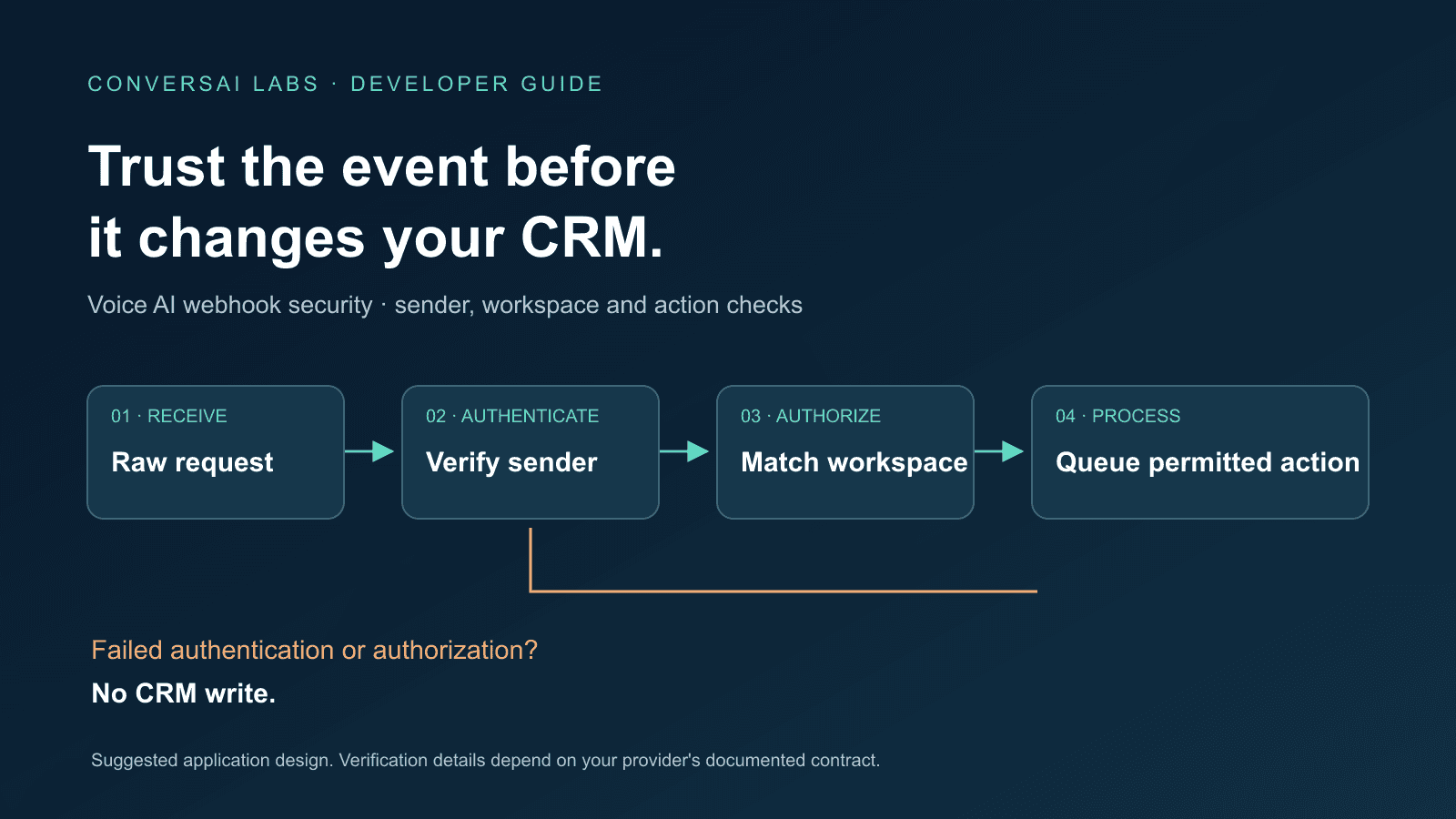
Before a voice AI webhook updates your CRM, verify who sent it, whether the payload changed, and whether the event belongs to the workspace and call you intend to update. A valid-looking JSON body is not enough. Signature verification, event validation and permission checks answer different questions.
For a marketing operations team, the consequence is practical: a fake “qualified lead” event should never create a sales task or change a deal stage. For developers, the place to enforce that rule is the server handling the webhook, before it queues any business action.
This guide is published by ConversAI Labs. It combines vendor documentation reviewed on 7 October 2026 with a suggested application design. The vendor examples are documentation references, not hands-on test results or a claim that ConversAI uses the same signature format.
What does webhook signature verification prove?
A correctly implemented signature check can establish that a request was signed with the expected key and that its signed content was not modified. It does not prove that a lead is qualified, a payment succeeded, or a CRM update is appropriate.
For example, GitHub documents an HMAC-SHA256 signature in X-Hub-Signature-256. Its guidance includes storing the secret securely and comparing signatures with a constant-time comparison. The algorithm and header belong to GitHub's contract; they are not a universal webhook standard. GitHub: validating webhook deliveries.
Keep these decisions separate:
| Check | Question it answers | Example failure |
|---|---|---|
| Sender verification | Was this request authenticated under the expected provider contract? | Missing or invalid signature |
| Freshness, where supported | Is the signed delivery recent enough? | Old signed request replayed later |
| Schema and event type | Do we understand this event? | Unsupported event or missing call identifier |
| Workspace and record authorization | May this integration change this record? | Call belongs to another customer |
| Business rule | Does the evidence justify this action? | Call ended, but no follow-up was agreed |
Preserve the body before parsing it
Do not assume that parsing JSON and serializing it again reproduces the bytes the sender signed. Middleware, whitespace changes and character handling can break a legitimate signature.
Retell's voice-webhook documentation illustrates this requirement: its examples verify the raw request body using X-Retell-Signature, the designated webhook API key and an SDK helper. It also distinguishes the key eligible for verification. Follow the provider's current instructions for the endpoint you operate; do not copy another vendor's header or key selection. Retell: secure the webhook.
In your deployment test, send a provider-generated event through the same gateway, framework and middleware used in production. Confirm that the verifier receives the expected body. A test that bypasses that path may miss a parsing problem.
Handle replay checks separately from duplicate work
A captured, correctly signed request can still be old. Where the provider signs a delivery timestamp, validate that timestamp using its documented policy and an accurate server clock.
Stripe is a useful example: its libraries normally allow a five-minute tolerance, and retries receive a new timestamp and signature. That is a Stripe-specific delivery policy, not a timeout to impose on every voice provider. Checking the age of a call's business timestamp is not an equivalent signature freshness check. Stripe: preventing replay attacks.
Freshness alone also does not prevent an otherwise valid delivery from being processed twice. After authentication, apply your durable event and business-action deduplication rules. Our webhook retries and duplicate CRM tasks guide covers that separate reliability problem.
Bind the event to the right CRM workspace
Consider an application serving two companies. A signed event referring to a real call still must not update whichever CRM record appears in an incoming field.
Our recommended design is to resolve the provider connection on the server, find the call in your own records, and check its workspace before selecting a CRM connection. Treat a payload's proposed record ID as data to validate, not permission to write.
For a lead-follow-up workflow, that means checking:
- The authenticated provider connection is associated with the expected workspace.
- The call identifier maps to a call your application knows about in that workspace.
- The CRM lead belongs to that workspace and is eligible for this action.
- The event supplies the required business evidence, rather than merely reporting that a call ended.
If the mapping is missing or ambiguous, hold the event for investigation without writing to the CRM. Use minimal diagnostic metadata, such as an internal event reference and rejection category; avoid copying transcripts, phone numbers or secrets into routine logs.
What should we test before enabling CRM writes?
Use synthetic records in a test workspace. These are suggested acceptance cases, not results from a test of any named platform.
| Test case | Expected business behavior |
|---|---|
| Valid, authorized event | Accept once and queue the permitted action after durable storage |
| Missing signature or wrong key | Reject without queuing a CRM write |
| Body changed after signing | Reject without queuing a CRM write |
| Expired signed delivery, where supported | Reject under the provider's freshness policy |
| Correctly signed event for another workspace | Prevent the cross-workspace update |
| Authentic event with unsupported schema | Hold or reject according to your documented handling policy |
| Repeat of an accepted event | Follow deduplication rules; no repeated business action |
During key rotation, test the provider's supported transition behavior and confirm that retired keys stop authenticating requests. Never resolve a failing verification check by permanently accepting unsigned events.
Where should a ConversAI workflow start?
Use the ConversAI API documentation to identify the call events and configuration your workflow needs. Before enabling sensitive downstream writes, confirm the current webhook authentication contract for your integration, including key management and retry behavior. This article does not establish a tested ConversAI signature mechanism.
Start with one event and one permitted CRM action. Verify the sender, workspace mapping and rejection cases in a test environment, then connect the durable processing flow. For the wider implementation sequence, see building a voice AI workflow with APIs and webhooks.
About ConversAI Labs Team
The ConversAI Labs team writes about building and operating voice AI workflows.