
Featured Article
Implementation
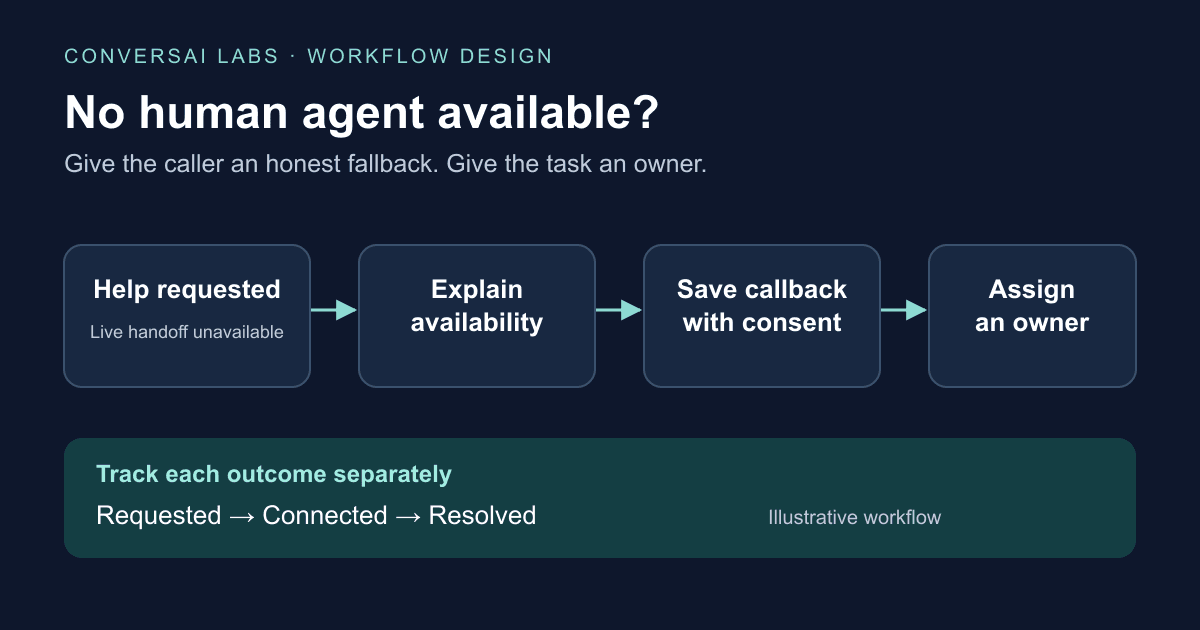
When a caller asks for a person and nobody is available, a voice AI workflow should explain the situation, offer an appropriate callback or alternative contact route, and save an owned follow-up task. It should only confirm a callback after that task is stored. A request to transfer is not proof that a human answered, and an unanswered transfer should remain an unresolved outcome.
This guide is for developers and marketing operations teams designing that fallback. ConversAI Labs publishes it as an implementation design, not a hands-on test of a contact-center integration or a claim that every platform includes live transfer.
Why does a human-handoff signal need a separate outcome?
A conversational agent can decide that a person should take over without connecting the caller to anyone. For example, Google's Dialogflow CX documentation describes its live-agent-handoff response as a signal to the API caller. The surrounding system or integration must perform the handoff actions; the signal itself does not change session state.
Telephony results also need interpretation. Twilio's Enqueue reference distinguishes a bridged call from a caller hanging up, a full queue and a system error. Its action callback timing depends on how the caller leaves the queue, so check the actual event's timing before using it as a real-time connection signal.
Keep three questions separate in your application: was help requested, was a person reached, and was the customer's issue resolved?
What should happen when no agent is available?
Set the routing rules before launch. Use the team's working hours, timezone, queue capacity and supported transfer behavior to decide whether to attempt a connection. Set a bounded wait policy and an exit route; a caller should not remain on hold indefinitely.
| Situation | Caller experience | Required workflow outcome |
|---|---|---|
| A staffed team can receive the call | Explain the transfer and attempt it | Record the verified connection result |
| The team is closed or the queue cannot accept the call | Explain availability and offer a callback or published contact route | Save a follow-up task if the caller agrees |
| Nobody answers within the configured wait | Return to a supported fallback, or follow the provider's documented failure path | Keep the transfer unsuccessful and record the next action |
| The caller hangs up before agreeing to a callback | Do not infer permission or a callback appointment | Record abandonment; follow your existing contact policy |
| Saving the callback fails | Say that the request could not be confirmed and provide an available alternative | Flag the failure for operational review |
Do not invent a waiting time or callback deadline. Only offer a time window that the receiving team can support. Verify whether your telephony integration can return control after an unsuccessful transfer; if it cannot, design the fallback before releasing the caller into that path.
Example: a prospect needs a specialist after hours
Suppose a prospect asks a voice agent about an integration that needs a technical review. The specialist team has finished for the day.
The agent can say: “Our technical team is unavailable right now. Would you like me to request a callback during their next working hours?” If the caller agrees, confirm the contact route, timezone and an available time window. Save the request with a short reason, then confirm what was actually saved. If a specific appointment was not reserved, call it a callback request rather than a booked appointment.
The next morning, an owner should see the pending request, the agreed window and enough context to continue. Sending an alert alone does not establish ownership: the task needs an assignee or a queue with a defined responsibility to accept it.
What should the callback record contain?
Use an application-owned task record with a reference to the call, the escalation reason, the receiving team, the agreed contact window and timezone, and its current status. Store contact details in your approved customer system and reference them by an internal ID. Give the receiving team the minimum useful summary rather than copying an entire recording or transcript into every notification.
A suggested sequence is requested → saved → assigned → attempted → resolved, with explicit cancelled and failed outcomes. These are example states for your own application, not ConversAI webhook event names. A callback attempt that goes unanswered must not become “resolved” automatically. Record the next agreed step, and prevent duplicate delivery from creating multiple tasks for the same request.
For that last part, see our webhook idempotency and retry guide.
How should you test the fallback before launch?
Test an available human, a closed team, no answer, a full queue, a caller hanging up, and a failed task write. Also replay the same event to check that it creates one task. Ask the receiving team to complete a callback from the saved record without needing to reconstruct the conversation elsewhere.
Review unresolved handoffs and overdue callbacks daily. Measure connected handoffs separately from requested handoffs, and resolved callback tasks separately from attempted calls. Those distinctions show where people are still waiting even when the voice conversation itself completed successfully.
How does this apply to a ConversAI Labs workflow?
Start with the API reference and your receiving team's task system. The reference currently documents call.analysed and call.failed as active webhook events. A post-call analysis event can support follow-up processing; it is not evidence of a live human connection or a real-time transfer trigger.
Confirm the transfer capabilities of the actual telephony setup before promising a live handoff. Build and test the callback queue as an explicit part of your application. Our self-service platform checklist covers the wider path from account access to an operational voice workflow.
About ConversAI Labs Team
The ConversAI Labs team writes about building and operating voice AI workflows.